
Arccos Driver Restricted2.2.1 - App Store
You'll be able to see results in few seconds.
Publisher Description
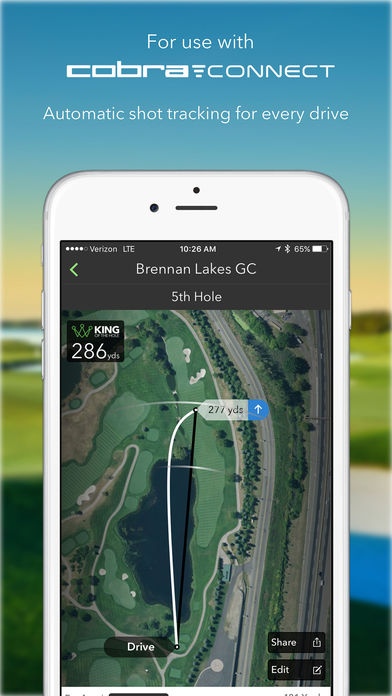
The Arccos Driver Restricted App is designed for use in Stipulated Rounds and is permitted under the Rules of Golf when a local rule permitting the use of distance-measuring devices is in effect. The Arccos Driver Restricted App contains all GPS rangefinder functions as well as shot tracking and data gathering functions as the fully featured Arccos Driver App, but does not display any historical data or information while a round is in progress.
The Arccos Driver app works with the Arccos Driver sensor, as well as any Cobra Connect driver featuring an Arccos sensor embedded in the grip (standard for KING LTD Black, KING F7 and KING F7+ models).
The Arccos Driver performance tracking and live competition system delivers real-time data for tee shot distances, fairways hit and more. The single-sensor platform achieves this by automatically detecting each drive and recording second shot position without the need for tagging or other annoying disruptions.
Arccos Driver features include:
* Advanced GPS for 40,000+ courses
* Distance and accuracy stats for every drive
* Precise Shot Detection that distinguishes between real and practice shots
* King of the Hole virtual long drive competition with live leaderboards
* Social bragging via one-touch posting to Facebook, Twitter, Instagram, text and e-mail
To start using the system, players simply attach the ultralight Arccos Driver sensor to the grip end of any driving club. This or a Cobra Connect driver Powered by Arccos is then paired just once to an iPhone using the free Arccos Driver app.
For the Arccos Driver app to work properly, users must keep their smartphone in a front pocket throughout their round.
The Arccos Driver sensor runs on a standard watch battery (CR2032). This lasts up to 50 rounds, with charge level monitored via a battery indicator in the Arccos app.
All Cobra Connect drivers Powered by Arccos feature second-generation hardware that comes with a two-year battery guarantee.
Arccos Driver uses the iPhone's background location capabilities to determine shot locations when in a round. Please be aware that continued use of GPS running in the background can dramatically decrease battery life.
Requires iOS 9.0 or later. Compatible with iPhone, iPad Wi-Fi + Cellular (3rd generation), iPad Wi-Fi + Cellular (4th generation), iPad mini Wi-Fi + Cellular, iPad Air Wi-Fi + Cellular, iPad mini 2 Wi-Fi + Cellular, iPad Air 2 Wi-Fi + Cellular, iPad mini 3 Wi-Fi + Cellular, iPad mini 4 Wi-Fi + Cellular, 12.9-inch iPad Pro Wi-Fi + Cellular, and 9.7-inch iPad Pro Wi-Fi + Cellular.
About Arccos Driver Restricted
The company that develops Arccos Driver Restricted is Arccos Golf LLC. The latest version released by its developer is 2.2.1.
To install Arccos Driver Restricted on your iOS device, just click the green Continue To App button above to start the installation process. The app is listed on our website since 2016-11-22 and was downloaded 0 times. We have already checked if the download link is safe, however for your own protection we recommend that you scan the downloaded app with your antivirus. Your antivirus may detect the Arccos Driver Restricted as malware if the download link is broken.
How to install Arccos Driver Restricted on your iOS device:
- Click on the Continue To App button on our website. This will redirect you to the App Store.
- Once the Arccos Driver Restricted is shown in the iTunes listing of your iOS device, you can start its download and installation. Tap on the GET button to the right of the app to start downloading it.
- If you are not logged-in the iOS appstore app, you'll be prompted for your your Apple ID and/or password.
- After Arccos Driver Restricted is downloaded, you'll see an INSTALL button to the right. Tap on it to start the actual installation of the iOS app.
- Once installation is finished you can tap on the OPEN button to start it. Its icon will also be added to your device home screen.
Program Details
System requirements
Download information
Pricing
Version History
version 2.2.1
posted on 2016-11-22
Disclaimer
Official App Store Link
We do not host Arccos Driver Restricted on our servers. We did not scan it for viruses, adware, spyware or other type of malware. This app is hosted by Apple and passed their terms and conditions to be listed there. We recommend caution when installing it.
The App Store link for Arccos Driver Restricted is provided to you by apps112.com without any warranties, representations or guarantees of any kind, so access it at your own risk.
If you have questions regarding this particular app contact the publisher directly. For questions about the functionalities of apps112.com contact us.
